
Fabian Bogegård
Game Programmer
I am proficient with C#, C++ and Java and I have experience working in Unity, Unreal Engine and GameMaker.
About Me:
I am an aspiring game programmer with a love for the interactable and visual side of coding. I love it when I can actually see my code work in a game.
Experience:
I have worked on plenty of personal projects since I started coding when I was 15 and I have also gotten to experience working in different teams during multiple school projects meant to simulate a real game development environment.
Aspirations:
I want create games that are truly unique that challenge what's currently possible in game development. When people play my games, I want them to think "How did they even make that!?"
Current Project

Hexa-Gone
Team Size: alone
Date: December 2025
Duration: 3 months
Projects

Hexa-Gone
Team Size: alone
Date: December 2025
Duration: 2 months

Age of Ashes
Team Size: 7 people
Date: September 2025
Duration: 4 weeks

Eclipse
Team Size: 19 people
Date: January 2025
Duration: 4 weeks

Racoon Rascal
Team Size: 16 people
Date: November 2024
Duration: 3 weeks

Asteroid Explorer
Team Size: 18 people
Date: May 2025
Duration: 7 weeks

---
---
---
---
Mini Projects

Conway's Game of Life
Date: November 2024
Duration: 4 weeks

---
---
---

---
---
---

---
---
---
---

---
---
---

---
---
---
---
Projects
![Racoon Rascal]()
Racoon Rascal
![Eclipse]()
Eclipse

Asteroid Explorer
![Conway's Game of Life]()
Conway's Game of Life


Resume

Hexa-Gone

Team Size
just me
Role
Developer
Duration
3 months
Engine
Unity
Description
Hexa-Gone was a school assignment with the goal of creating a game that utilizes the Action Stack pattern. It was also one of my last projects in my Futuregames education, and I decided to do my best to utilize everything I had learned during the program. Moreover, I wanted to learn as much as possible from this project.
Purpose
To display my understanding of the Action Stack pattern as well as show off the skills I learned during the Advanced Gameplay course, which this assignment was part of.
Hexagon Grid
This was my first time working with hexagon grids. However, I had worked with square grids plenty of times, so I felt ready for the challenge. Overall, most algorithms, like pathfinding, work largely the same on hexagonal grids. The Biggest difference with hexagon grids is the coordinate system.
Hexagon grids can use different coordinate systems. The one I ended up choosing is usually called the axial system. It uses 3 different dimensions, and each tile has a set of 3 integers that define its placement. However, since each tile's coordinates should always add up to 0, you can actually calculate one coordinate using the other two. Therefore, each tile really only uses two coordinates.
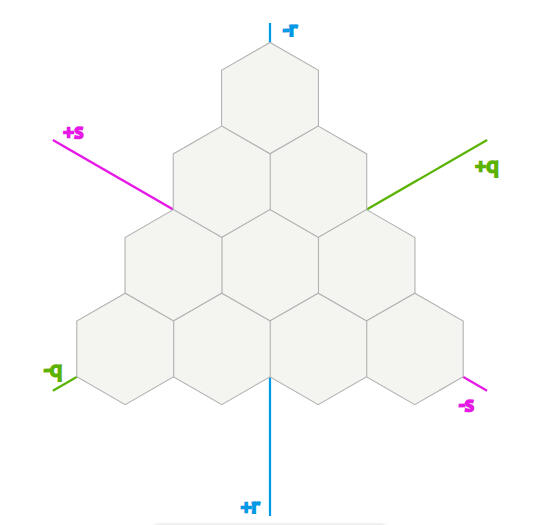
Since the axial coordinate system uses different coordinates than vectors do, I had to find a way to convert axial coordinates to vector coordinates. The documentation I read on hex grids had no way to do this, so I had to figure it out myself. After brainstorming for a while, I came up with a way to convert axial to vector, which naturally ment i could also convert vector to axial.
Rendering The Grid
Since the hexagon grid is key to the game logic, it needs to be optimized to accommodate large sizes. I had to find an efficient way to render the tiles without putting too much strain on performance. I experimented with various methods, including rendering all tiles as a single mesh. However, I wanted the flexibility to change the colors of each individual tile, which would be too demanding if I used a single mesh approach.
After conducting tests and research, I decided to use DrawMeshInstanced, a function that can efficiently render a mesh in batches through GPU instancing. This method is highly optimized and allows for easy color changes on tiles.
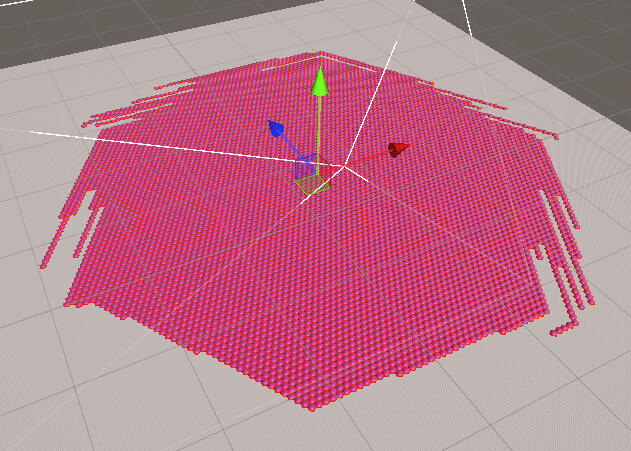
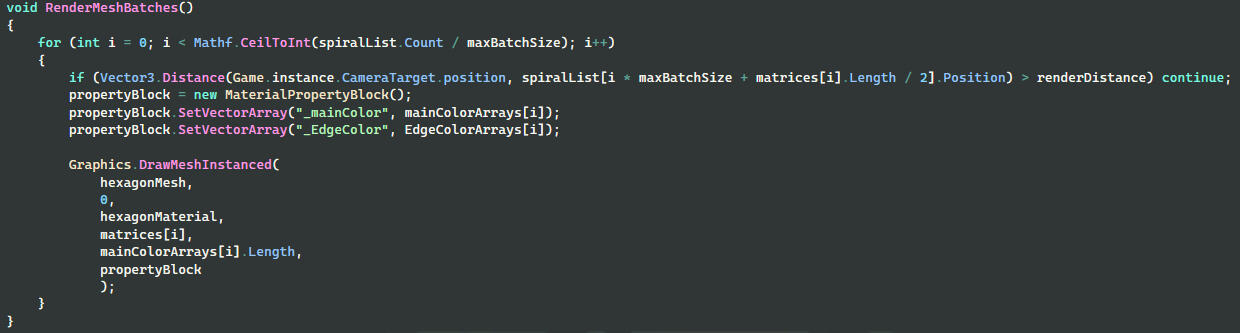
The DrawMeshInstanced function renders the mesh in batches, which inspired me to implement chunk logic in the rendering process. By checking the distance from each batch to the camera, I could selectively render only the relevant tiles. This approach significantly improved performance. Rendering the tiles this way allowed for a grid comprising hundreds of thousands of tiles without experiencing much performance loss.
Gameplay
The gameplay is inspired by games like divinity and baldurs gate 3 and consists of turn based combat. All units have a set of Actions they can take during a turn like attacks, movment, and buffs. They also have resistances and weaknesses to certain elements.

All attacks are grid based and target specific tiles rather than units.
All units have diferent stats that determine their ability like acuracy, evasion, speed and range.
Racoon Rascal
Team Size
16 People
Role
Character Programmer
Duration
3 Weeks
Engine
Unity
Description
Racoon Rascal was a group project lasting 3 weeks and was an assignment from my programming education as well as my first experience with working with a team to make a game. It was a very fulfilling experience that taught me a lot and I think back fondly upon it.
Purpose
To simulate a real working environment and learn to work together with other disciplines.
What I Did
During this project, I was in charge of programming the character movement as well as implementing all the sounds in the game.
The Game
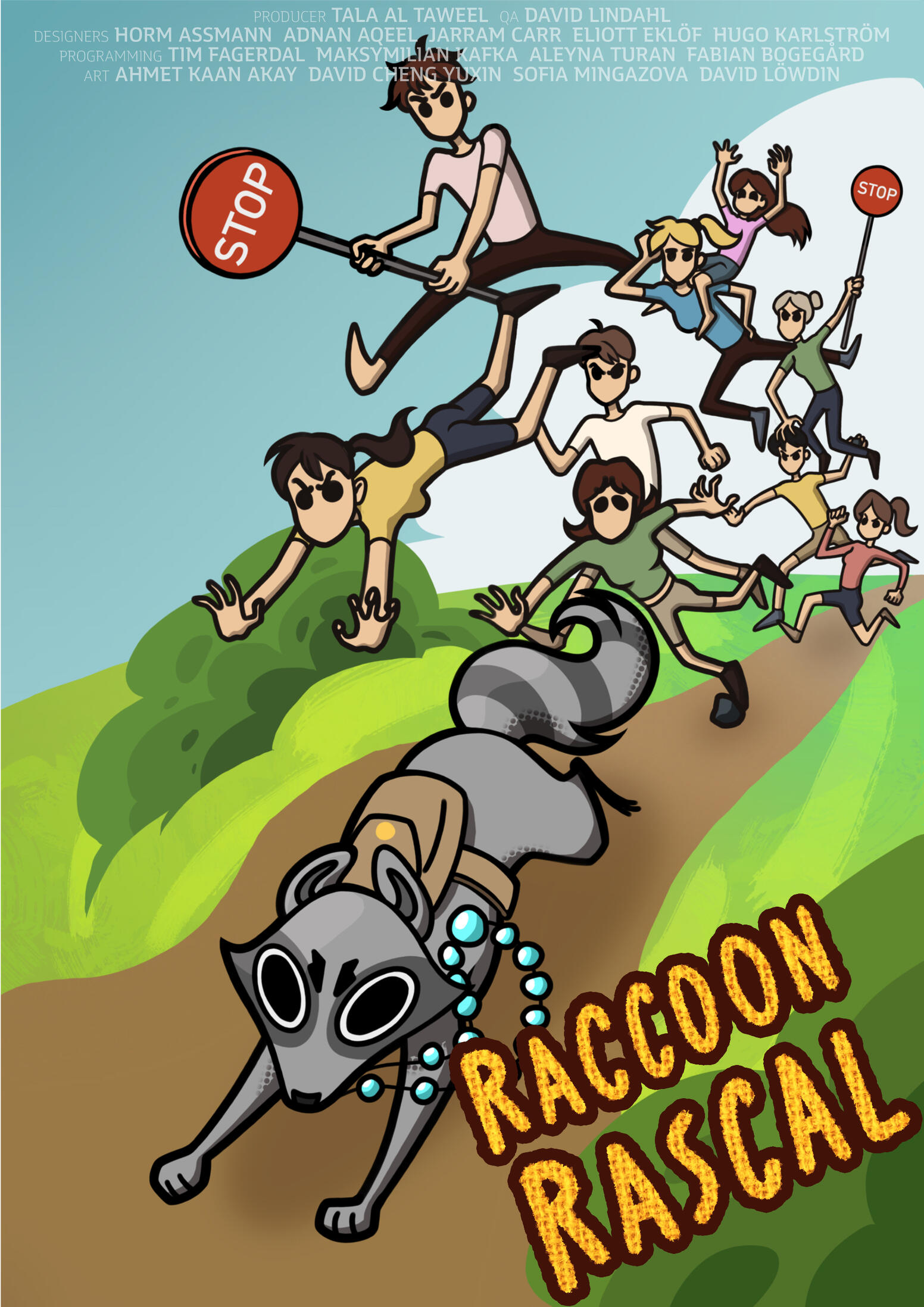
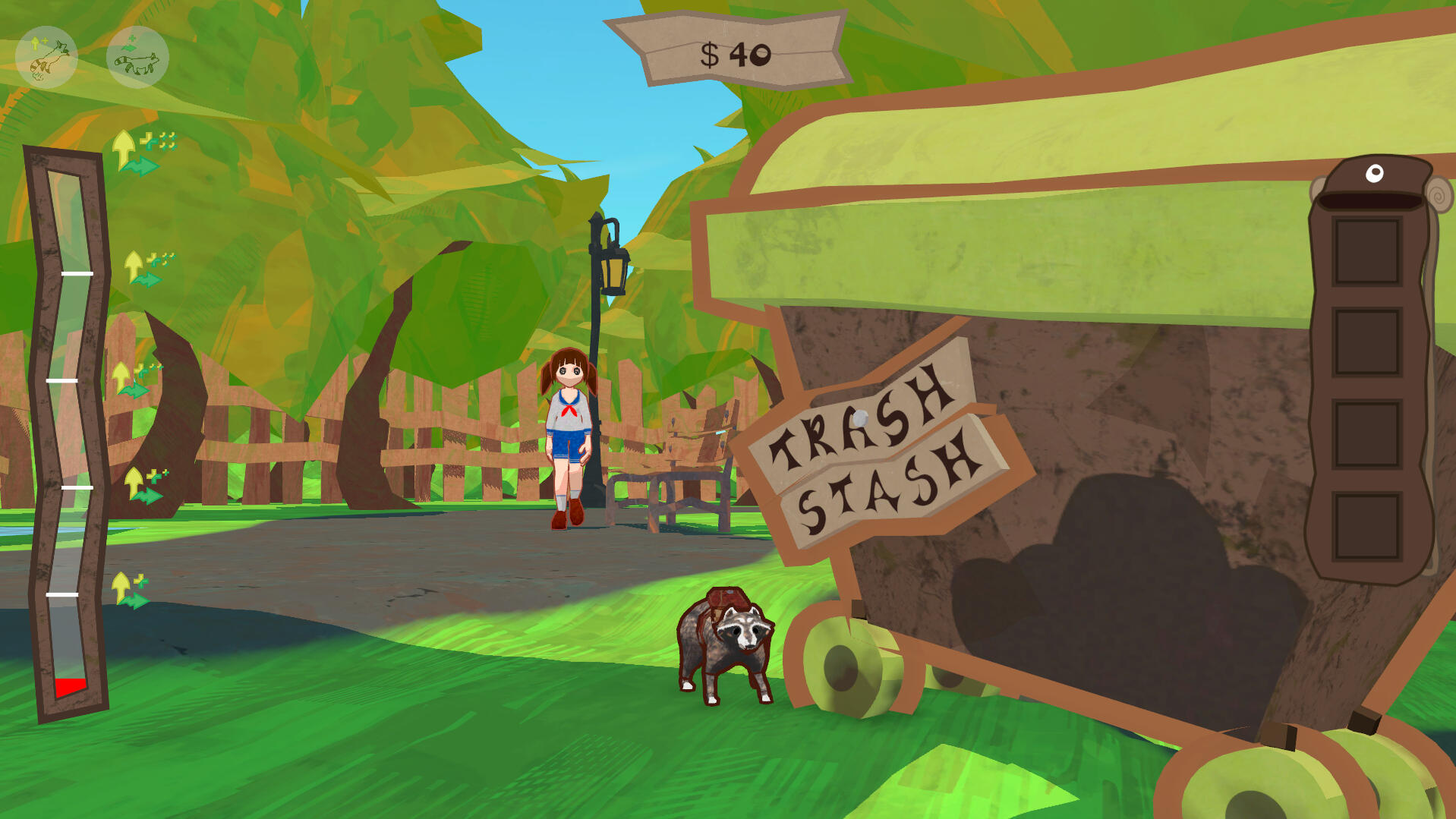
The game centres around a racoon that has one sole goal in life. Stealing anything from anyone. The game loop consists of running around a park full of humans and your goal is to collect valuables like spoons, necklaces and coins while also avoiding the humans who try to catch you.
Character Controller
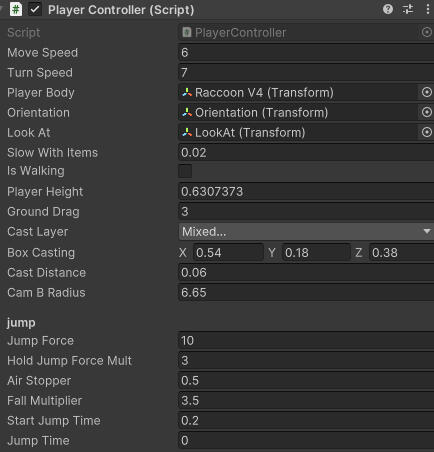
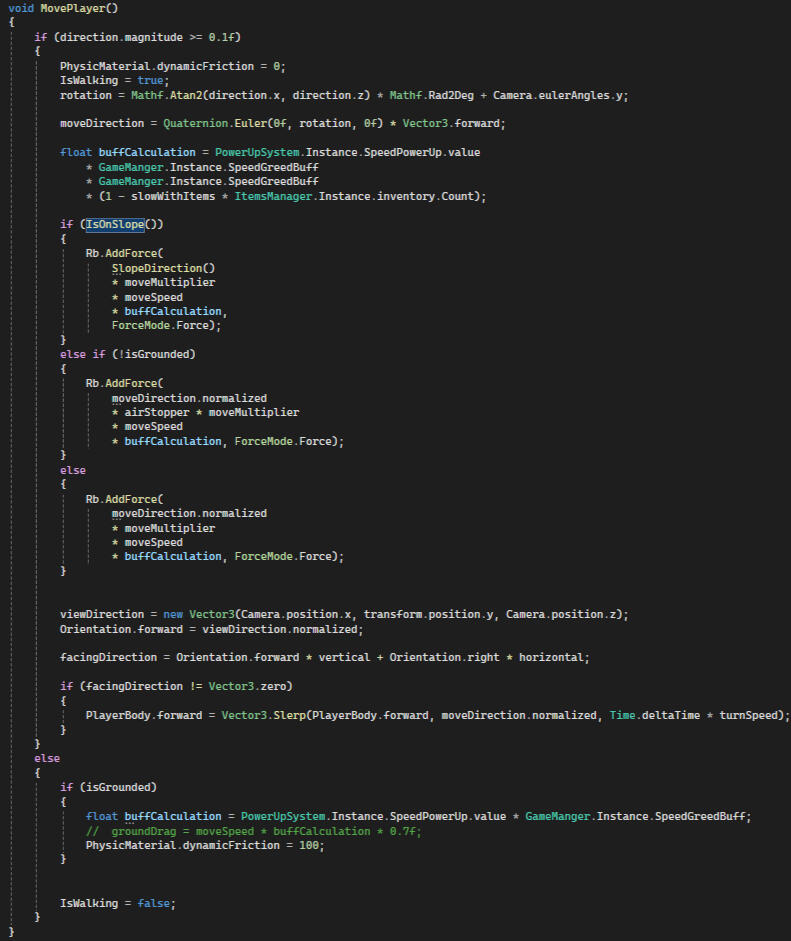
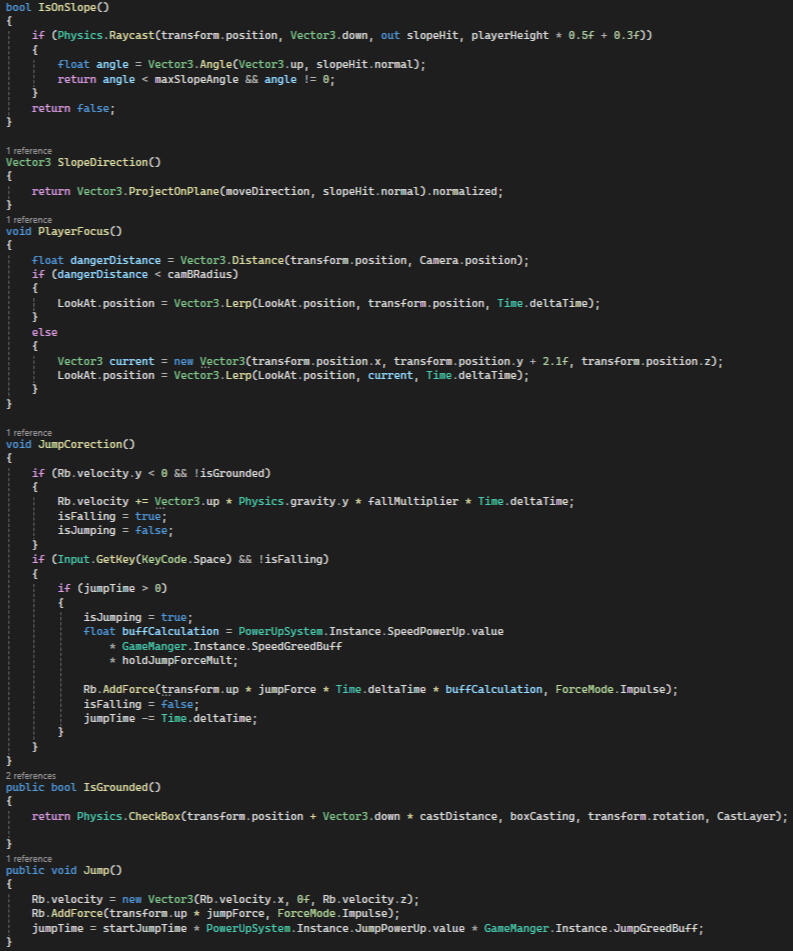
Being a game focused on runing around, it was very important that the movement felt good. This was also my first experience coding a movement system and all things considered, I think I did a pretty good job. Of course, looking back on my code now, there is a lot I wish that I had done differently like adding a input buffer for jumping but I definitely consider this to have been a very valuable learning experience for me.
Difficulties
One thing that became apparent to me fast was the fact that I would have to make practically every aspect of the controller accessible and editable in the editor so that the designers could fine tune them exactly like they wanted. There was also always something that needed to be changed, fixed or iterated upon which meant that most of my time was spent fine tuning the controller.
Camera
I decided to use Unity's Cinemachine for the camera controls because it was much simpler than coding it from scratch and seemed like the best option given our deadline.
I did have to add some code to change which direction the camera was looking in situations where the player walked under obstacles since the camera would normally look slightly above the player.
Character Controller Code:
Sound System
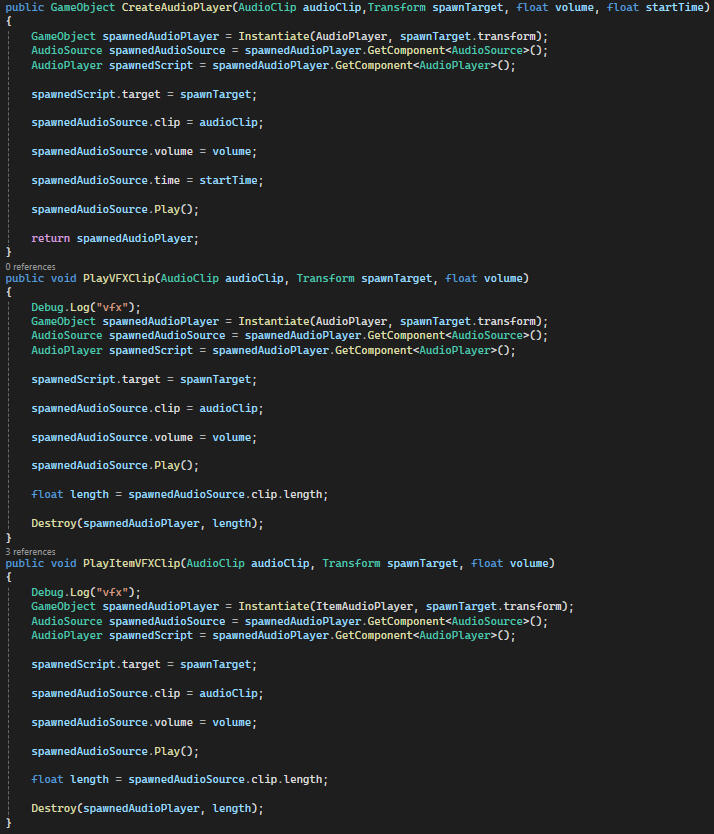
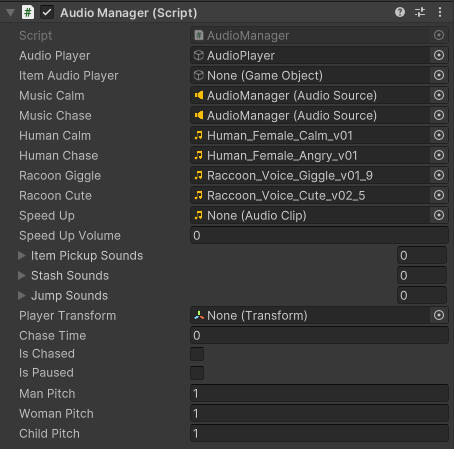
Since we didn't have a official sound designer and I was new to sound implementation, none of us knew about FMOD and so I created a audio manager instead to play all our sounds. It was just a singleton which stored all of our sounds and had functions to play them in different ways. Looking back. I wish that I made a more flexible solution than just storing all the audio clips individually since it requires someone to add each sound in code. However, other than that, it worked fine for our purposes, allowing us to play sounds from anywhere.
Take Aways
Working with other people brings plenty of benefits but it can also introduce many new difficulties. This was my first time working on a game with other people and I gained some invaluable insight in how what the difficulties are as well as how to deal with them. I also got to learn how to use tools such as Miro, Jira and Perforce as well as how to make effective use of them.
Contributions:
Horm Assmann - Product Owner
Tala Al Tawel - ProducerHorm Assmann - Systems Design
Adnan Aqeel - AI Design
Jerram Carr - Level Design
Eliott Eklöf - UI Design, Music Design
Hugo Karlström - UI Design
David Lindahl - Sound DesignTim Fagerdal - UI Programming, Systems Programming
Maksymilian Kafka - AI Programming
Aleyna Turan - Systems Programming
Fabian Bogegård - Character Programming, Sound ImplementationAhmet Kaan Akay - Character Art, Props
David Cheng Yuxin - Character Art, Rigging, Props, Cosmetics, Textures
Sofia Mingazova - Concept Art, Props
David Löwdin - Animation
Adnan Aqeel - VFXDavid Lindahl - Quality Assurance
Eclipse
Team Size
19 People
Role
Settings- and Combat Programmer
Duration
4 Weeks
Engine
Unity
Description
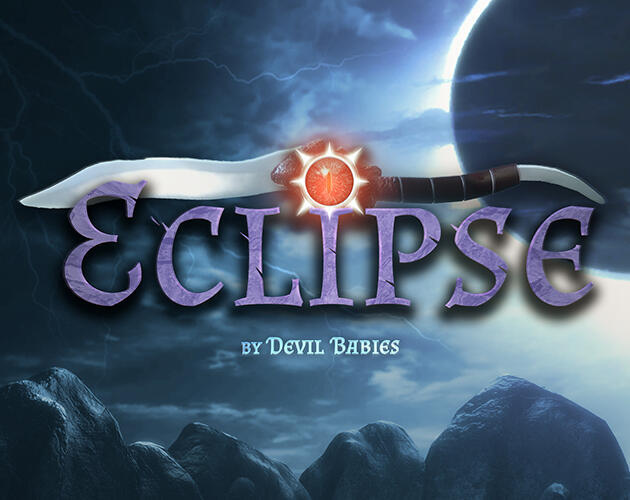
Eclipse was my second school group project lasting 4 weeks. The assignment was to make a first person game centred around an imaginary concept called Dagger Blade.
Purpose
To simulate a real working environment and learn to work together with other disciplines.
The Game
Eclipse is a FPS high-octane speedrunning game where you have to kill the enemies and escape as fast as you can. You are equipped with a crossbow and a dagger with the ability to drain hp from your enemies and use it to execute abilities.
What I Did
During this project, I was in charge of programming the the attacks and abilities of the player as well as the settings of the game.
Combat
This game featured a crossbow and dagger as the main forms of attack. The design of the exact mechanics of the combat was iterated upon many times during development so I always tried to prepare for any future design changes and make every variable editable in the editor. The damage system was just an interface with a take damage function.
The projectile launcher was slightly more complicated since they wanted them to be physical projectiles rather than a raycast and that they stuck to the things they hit. Firing them was easy enough using a origin and the camera position to calculate a vector. Getting them to stick turned out to be trickier. My first thought was to simply parent they projectile to whatever it hit which worked fine most of the time. However, sometimes the scale of the projectile would warp in strange and inconsistent ways when it hit certain objects. I tried many solutions to fix this such as setting relative and world positions manually and using parent constraints to try to keep the scale consistent. After a lot of debugging, I realised that it would happen if the object it collided had a non uniform scale. It tuned out to be an issue with the scaling and structure of the projectile and it's components.
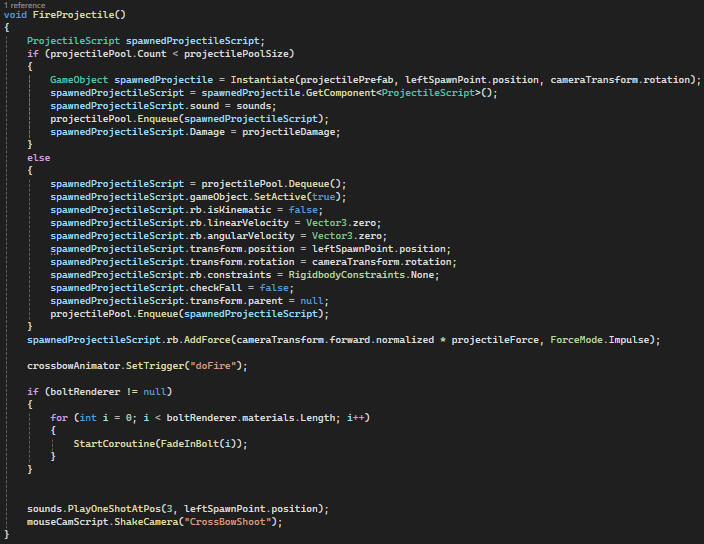
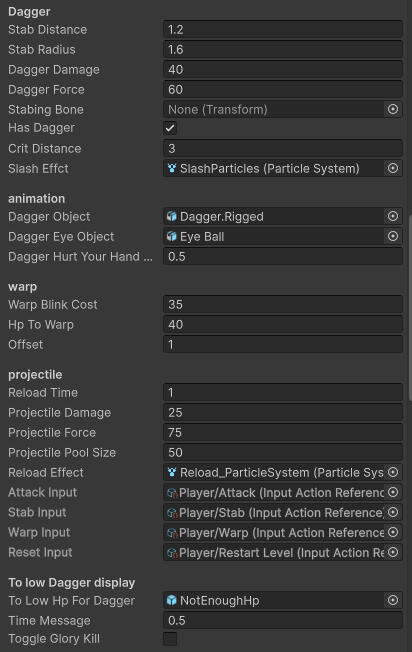
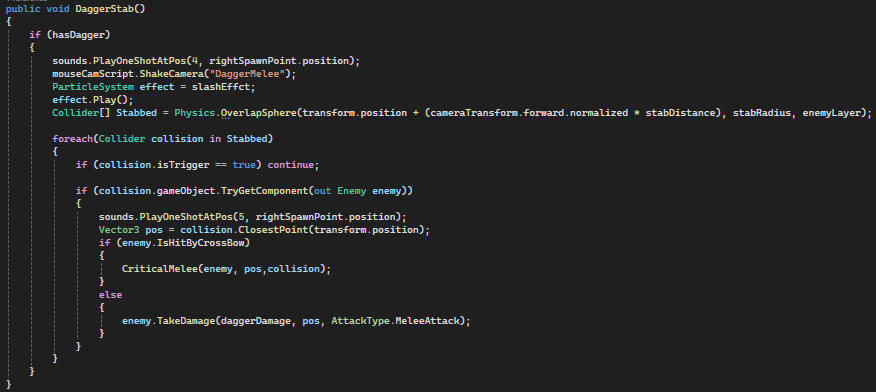
During the first days of the project, I was assigned to code the basic attacks of the game which included firing a projectile from the crossbow and a melee strike using the dagger. Since the game was focused on speed running, I decided to use a overlap sphere for the stab attack since the collision was supposed to be quite forgiving.
The dagger also had a warp ability which allowed you to throw the dagger at an enemy, killing it, and teleporting the player to it. This ability was suposed to speed up the experience and introduce more variation to the gameplay. The implementation was fairly simple, just a projectile that would move the player when it hit an enemy.
Damage
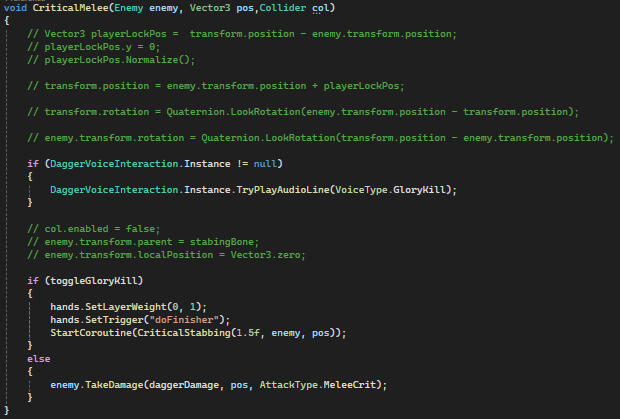
During development, the designers went back and forth on just how the damage should work. I knew that I would use an interface with a TakeDamage function. It was eventually decided that the dagger would normally deal low damage and the crossbow would inflict a vulnerable state on the enemy which made them killable with a single strike from the blade. It was initially intended that the game would have finishers when inflicting critical hits or throwing the dagger despite programmers insistence that we wouldn't have time. I made some code to freeze the player and enemy positions and rotations to play a finisher animation. However, the idea was scraped after the beta version due to the realisation that it didn't match the fast paced feel of the game.
Settings
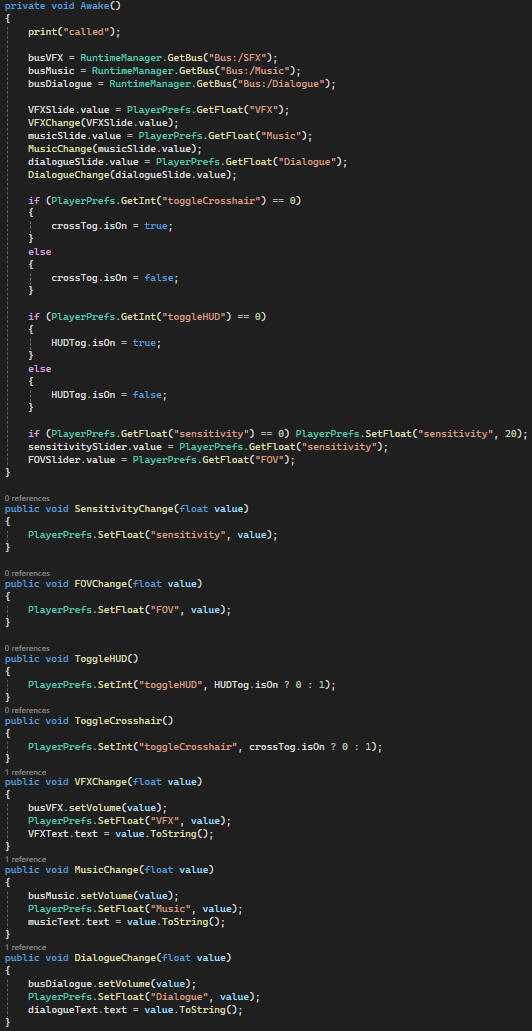
I was put in charge of adding functionality to the settings menu whic hincluded audio settings, toggles and rebinding keys.
Since we were using FMOD, the audio settings were simple to set up and connect to sliders.
We wanted the settings to be saved between sesions to i used PlayerPrefs to save values and loaded them on awake
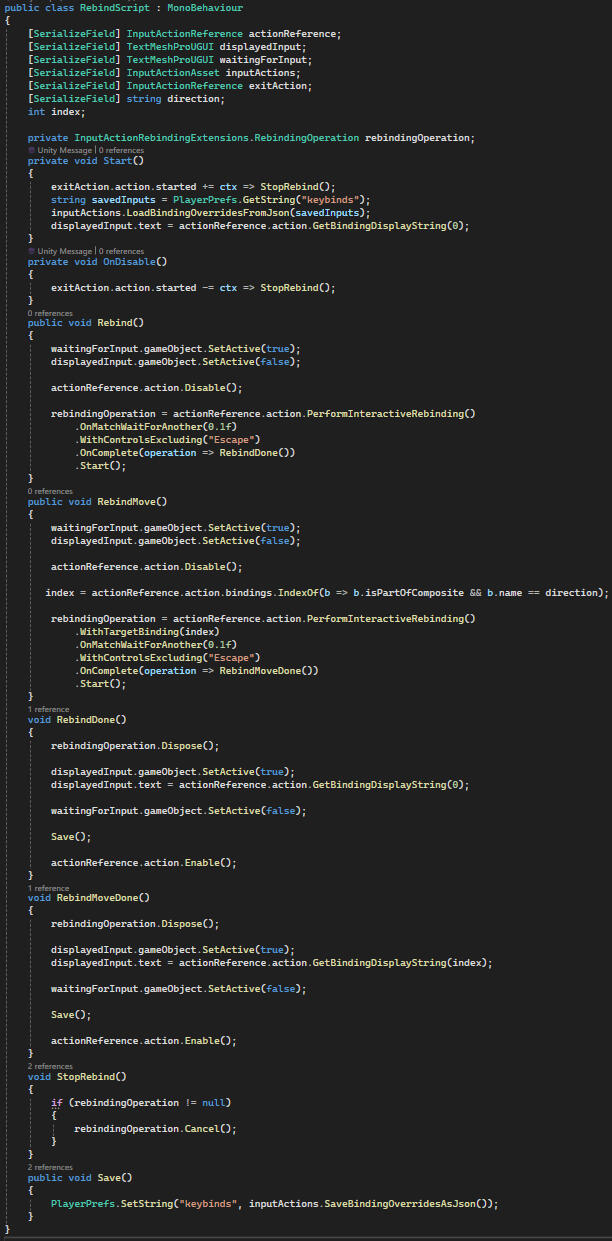
Rebinding was new to me so I had to look into how to do it in unity. I believe I did it in a fairly standard way but I gained some valuable insight in unity's input system. I also saved the key binds in PlayerPrefs by saving the InputActionAsset's SaveBindingOverridesAsJason function as a string and loaded it on start. I had some trouble understanding how to get the key character to display in the UI, especialy with the movment keys since the input action works diferently because it contains multiple keys.
Take Aways
During this project I learned to effectively gauge how much work I need to put into different tasks and I got more insight on how to effectively work with other people, especially during disagreements. I also learned that I have a preference for working with the interactive and gameplay side of game development. Though I like to work on background systems like settings to gain insight into how they work. Of course, I also gained more familiarity with Unity and C#.
Contributions:
Design
David Öberg: Level Designer
Jerram Carr: Narrative Designerand Sound Designer
Seth Renberg Byström: GameplayDesigner
Marcus Granlund: Systems, Mechanics and 3C DesignerProgramming
Eddy Grootenboer: Tools and Gameplay Programmer
Fabian Bogegård: Settings and Combat Programmer
Lucas Randers: AI, Sound and Movement ProgrammerArt
Alp Tamer: Lighting and Environmental Artist
Ahmed Matar: 3D Artist
Dimitris Fragkedakis: 3D Props Artist
Görkem Geyik: Technical ArtistVFX & Animation
Albin Lundh: VFX and Animation
Irina Makryniotis: VFX and AnimationUX Design
Elton Lindberg: UX Design, UI Implementation
Viktor Vilcans: UI Designer, 2D ArtistSound
Andreas Karnung: Music Composer
Henrik Thomasson: Music Composer, SFX
QA
Oliver Storeide Olovsson: Quality Assurance
Producer
Christian Carlos: Producer
Asteroid Explorer
Team Size
18 People
Role
Systems- and gameplay Programmer
Duration
7 Weeks
Engine
Unreal Engine
Description
Asteroid Explorer was my third school group project lasting 7 weeks. It was also my first time working in a team in Unreal Engine.
Purpose
To simulate a real working environment and learn to work together with other disciplines.
The Game
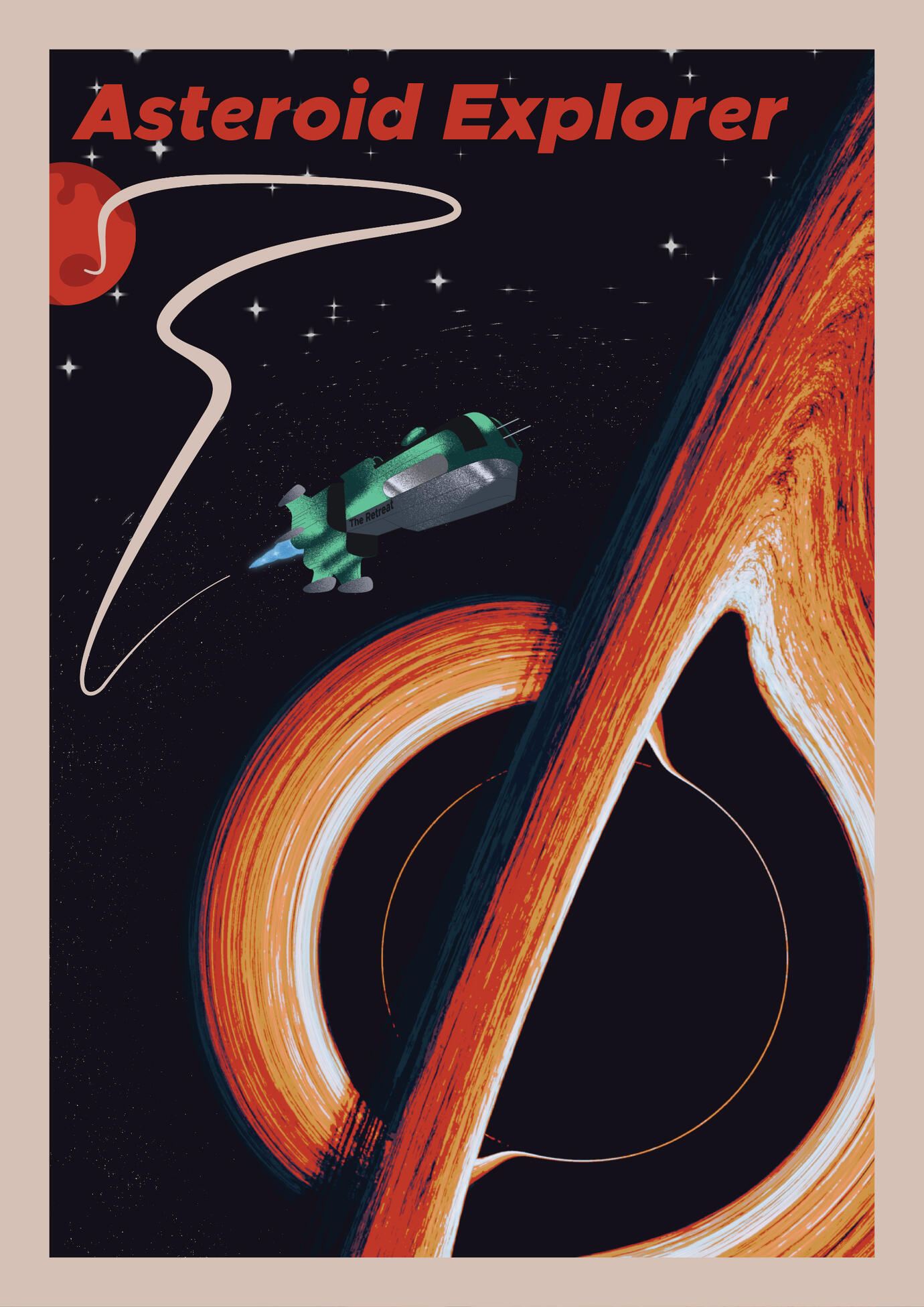
Asteroid Explorer is about a space crew getting stranded on an asteroid where you play as a Robot, gathering energy ores to refuel the ship that stranded your creators there.
What I Did
During this project, I was originally put in charge of systems but I was quickly put in charge of our gadget mechanics too.
Gadgets
To add variation and more traversal and obsticle options, they added gadgets to the game which were diferent gameplay mechanics that you could switch between. Originaly, there was suposed to be four diferent gadgets. However, two of them were removed from the final game shortly before the final deadline.
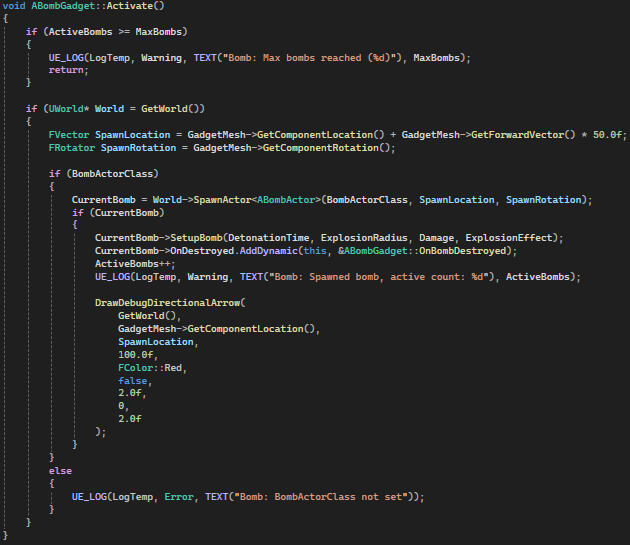
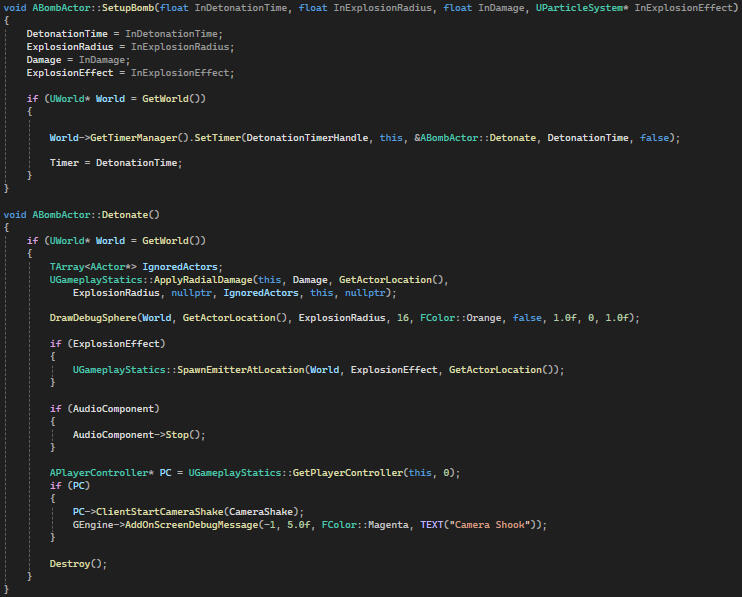
Bomb
The bomb was quite simple to implement. The gadget itself just spawns a bomb and calls it's setup function. The bomb just sets a timer to call its detonation. The detonation itself uses Unreal Engines ApplyRadialDamage function to its surroundings.
Thruster
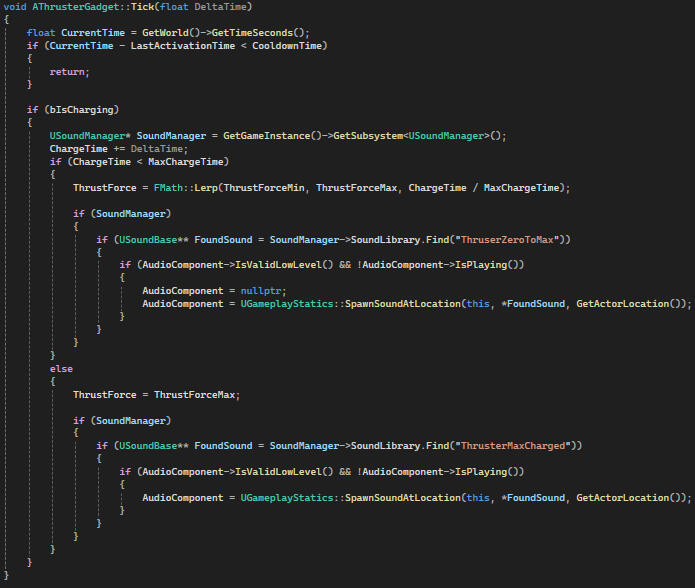
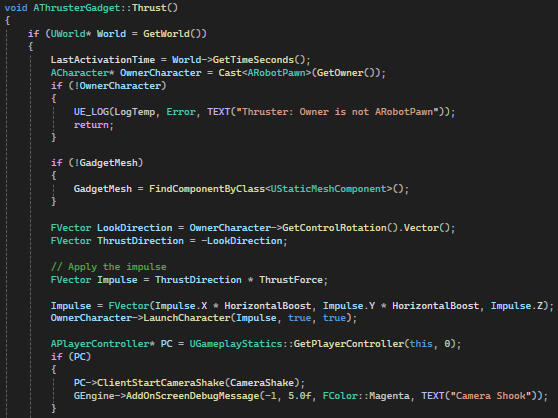
The thruster was added to allow for more creative level design as well as to add to the gameplay experience. It adds a force opposite to the direction the player is looking and gets stronger the longer you charge it. Calculating the direction was as easy as reversing the control rotation player. However, the power of the force required a little more thought. I decided to use linear interpolation between a min and max force and dividing the elapsed hold time with a max time as the alpha value to calculate the force.
Systems
My role of systems programmer diminished somewhat when I was put in charge of coding the gadgets. I mostly added small changes in all over the project such as camera shakes, environmental hazards and UI implementation. However, I did make some systems such as the sound manager.
Sound Manager
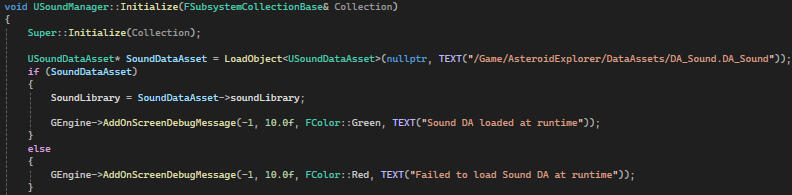
We didn't use FMOD for this project because everyone was new to Unreal Engine and didn't know how to implement it. In hindsight, it would properly have been better if we did use it anyway. I instead had to make my own sound manager to easily play sounds from anywhere. I decided to use a subsystem as the sound manager since it can be accessed from anywhere and persists between scenes. Since you can't make a blueprint into a subsystem, I decided to use a data asset to store our sounds and have the sound manager access that.
I had to load the data asset manually since it couldn't be assigned in the editor
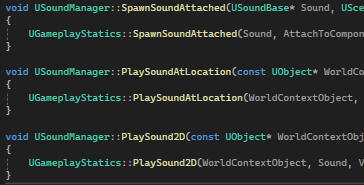
The sound manager itself didn't need to do much since it was just a way to access the sound library from anywhere but I added some functions to play the sound without needing to include UGameplayStatics everywhere
Take Aways
This project familiarized me with Unreal Engine and gave me further insight into working as a team. Above all, I realized the importance of organization and leadership as well as what happens when either of them are lacking. This is not my proudest work. However, it taught me a lot and will help me avoid doing the same mistakes I did during this project.
Contributions:
Producer:
Aman MoryaDesigners:
Philip Söderström
Hugo Nykvist
Isak Söderqvist
Michal KowalczykVFX:
Hannes DhalbergSound:
Åsa Carlsson
Artist:
Nil KocUI/UX:
Vincent NordQuality Assurance:
Alexander MalmProgramming:
Serkan Tulunay
Dileep Kp
Fabian Bogegård
Marcus Wessman
Conway's Game of Life

Team Size
solo
Role
Programmer
Duration
2 days
Engine
Unity
Description
This was a small I made for fun to develop my skills.
Purpose
Developing my skills and expanding my knowledge.
Game of Life
Conway's Game of Life is a very striped down version of a population simulation. It takes place on a grid where each node can only be alive(active) or dead(inactive). The game makes use of four rules that are applied to all nodes and determine their states.
The result of applying these rules is a fascinating patten of moving nodes:

The Rules:
1. Any live cell with fewer than two live neighbours dies, as if by underpopulation.2. Any live cell with two or three live neighbours lives on to the next generation.3. Any live cell with more than three live neighbours dies, as if by overpopulation.4. Any dead cell with exactly three live neighbours becomes a live cell, as if by reproduction.
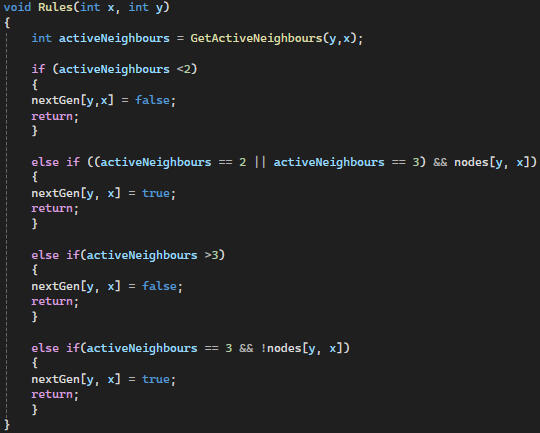
By applying these rules on every node and saving the result to a new grid, you create the next "generation" of nodes. After that, the new generation is applied and rendered and the rules are applied again.
Rendering
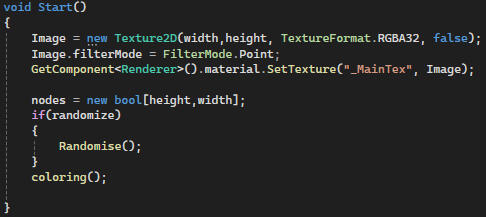
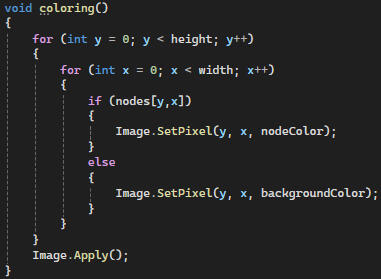
I decided to render the grid by creating a custom texture and render each pixel as a node since I figured it would be the most efficient solutions which allowed me to render simulations on grids with over 700*700 nodes.
Take Aways
This project deepened my understanding of arrays and algorithms. It also taught me a lot about textures and optimization. When I started this project, I created each node separately which severely limited the size and speed of the simulation. After this project, I have found myself thinking more about how to optimize my code.
Age of Ashes
Team Size
7 People
Role
AI Programmer
Duration
4 Weeks
Engine
Unreal Engine
Description
Age of Ashes was my fourth school group project lasting 4 weeks. It was made by a smaller group which just two programmers.
Purpose
To simulate a real working environment and learn to work together with other disciplines.
The Game
Age of Ashes is inspired by games such as Desert Strike and Clear Hot, combined with the power fantasy of being a mighty dragon. You fly around and destroy buildings in a city while military tries to stop you.
What I Did
During this project, I was in charge of enemy AI but due to the limited number of programmers, I also worked on many other aspects of the game.
Take Aways
Above everything else, this project taught me how to work proactively and to do my part. Being only two programmers meant there was a lot of responsibility on us. I had to always
Contributions:
Designers:
Stefan Eriksson
Carl Leong
My Lindberg
Frida ThomanderProgrammers:
Fabian Bogegård
Simon ÅgrenMusician:
Theodor Myrberg